Tiny Planes Guides & Walkthroughs
From first runway to barn finds and disaster rescues — every tutorial in one place.
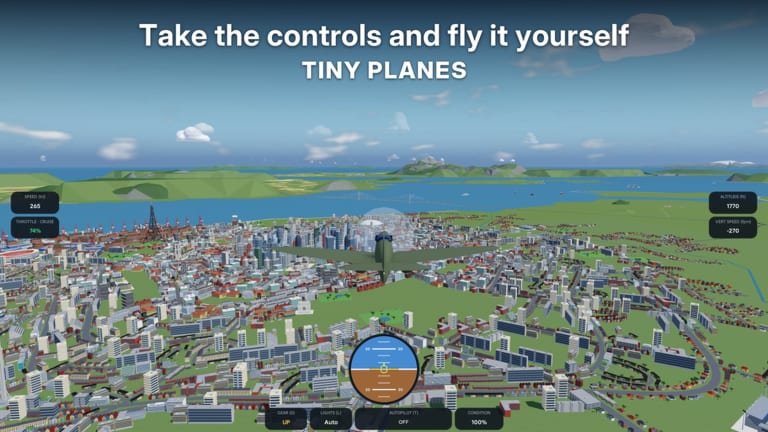
Welcome to the Tiny Planes guides hub. This Roblox airfield tycoon by XeroInteractive asks you to build an airport, grow a fleet of 150+ real aircraft, open routes across four islands, and sometimes take the stick yourself. Use this page as a map: each guide below covers one system in depth, with cross-links so you can jump between building, flying, exploring, and earning.
If you just joined, start with Getting Started. It walks through the tutorial runway, free shop aircraft, recruiting pilot Josi, dispatching your first flights, daily rewards, playtime cash boosts, and redeeming codes from the Star icon after the tutorial. Pair that with the tier list once you have cash to spend wisely on aircraft.
Core guides
Getting Started
Day-one checklist for new players. Covers leveling the runway, landing zones, claiming a free shop plane, hiring Josi, opening routes, claiming daily and playtime rewards, and when to redeem promo codes. Best first read if your island still looks empty.
Controls
Full flight and UI keybind reference: pitch, roll, throttle, brakes, gear, autopilot (T), camera, map, hide UI, and the in-game controls help overlay. Essential before you hand-fly landings or chase barn finds across islands.
Airport Building
Build Update deep dive — draw curved taxiways, roads, and runways at any angle; place gates with self-fitting jet bridges; and assemble custom hangars, towers, and lights from resized, rotated, and painted parts. Layout tips so traffic flows without gridlock.
Barn Finds
How rare aircraft appear as restorables in hidden locations (including the Concorde example), how to explore the four islands safely, and how restored classics fit into your fleet and flex goals.
Disaster Missions
Emergency careers against tornadoes, wildfires, tsunamis, and volcanic eruptions. Why disaster jobs pay well, which aircraft and prep help, and how to fold rescues into a healthy cash loop alongside regular routes.
How to use this hub
Read in this order on a fresh account: Getting Started → Controls → Airport Building. Once your runway and gates work and you can hand-fly or use autopilot confidently, peel off into Barn Finds for exploration goals and Disaster Missions when you want faster cash and specialized aircraft. Multiplayer sessions support up to five players, each with their own island — fly to friends after your home field is operational.
Shop inventory restocks roughly every 15 minutes, so plan purchases around restocks and code cash rather than impulse-buying the first mid-tier jet you see. Autopilot (T) is fine for routine hops; switch to manual when learning landings or hunting obscure island spots. Keep Codes bookmarked — new promo drops often accelerate early expansion more than a single route.
Related wiki sections
- Codes — active promo list and Star-icon redemption steps
- Tier List — aircraft priorities once you have spending money
- Updates — patch notes for Build Update features and balance changes
Cross-link every guide you finish: the same systems stack. A cleaner airport from the building guide makes disaster staging easier; solid controls make barn-find flights less crash-prone; disaster cash funds the next shop restock. Bookmark this hub and return when a new mechanic unlocks.
FAQ path
New players usually ask the same five questions: where to start, how to fly, how to build, where rare planes hide, and how to earn faster. The five guides above answer those directly. If something still feels unclear after the tutorial prompts, re-open Controls (press C in-game for the help overlay) and re-check Getting Started before grinding routes blind.
Stay consistent: claim daily rewards, ride playtime cash boosts, restock-shop with intention, and expand runways and gates before chasing every shiny airframe. Tiny Planes rewards airports that work — then fleets that look cool. Use the guides below to build that foundation without wasting your first million.
Frequently Asked Questions
Quick answers for Tiny Planes pilots and airport builders.
Which Tiny Planes guide should I read first?
Start with Getting Started for the tutorial, free plane, Josi, and codes, then Controls before hand-flying, then Airport Building to expand your field.
Do these guides cover multiplayer?
Yes where it matters: up to five players, each with a private island, can fly to each other after home airports are online. Core progression still begins on your own island.
Where do barn finds and disasters fit in?
After your runway, shop plane, and basic routes work. Barn Finds covers exploration and restorables; Disaster Missions covers high-pay emergency careers and prep.
How often should I check Codes while following guides?
After finishing or skipping the tutorial, open the Star icon and redeem anything active before big shop purchases. Shop stock refreshes about every 15 minutes.